

Authentication - Azure B2C
Last updated: 13 November 2025
Infrastructure Setup
Azure B2C App Registrations
- Create or Update the B2C App Registrations
- We will need an app registration for all 3 environments (Dev, Preprod and Production)
- Inside the registration, navigate to the authentication sidebar
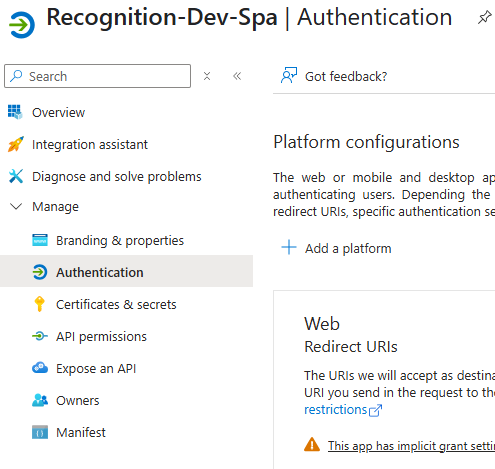
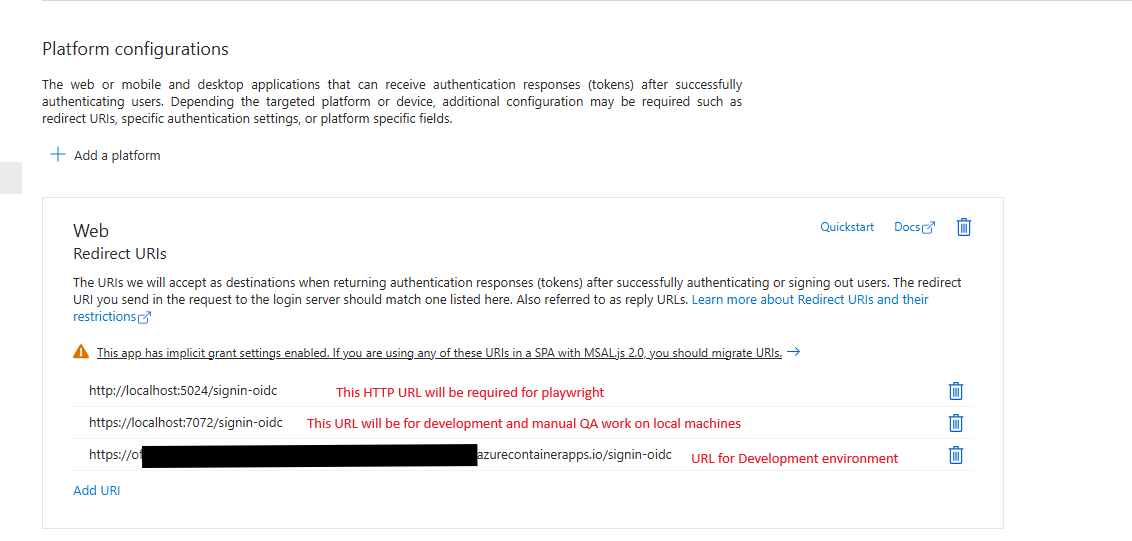
- Under Redirect URL’s add the B2C callback path to the record, all should be appended with /signin-oidc
- For Development, we will need to add 3 Redirect URIs to use:
- A localhost HTTP redirect for CI Playwright testing
- A localhost HTTPS redirect for local development and QA use
- The full URL of the hosted development environment
- For Production, only add the URL for the hosted environment
- An example of a development environment setup should look something similar to this:
- Add a Front-Channel logout URL, this should be similar to the Redirect URL for the hosted environment, substituting the /signin-oidc suffix with /signout-oidc
- Enable Access Tokens and ID Token Checkboxes for Hybrid Flows
- Ensure that public client flows are not allowed
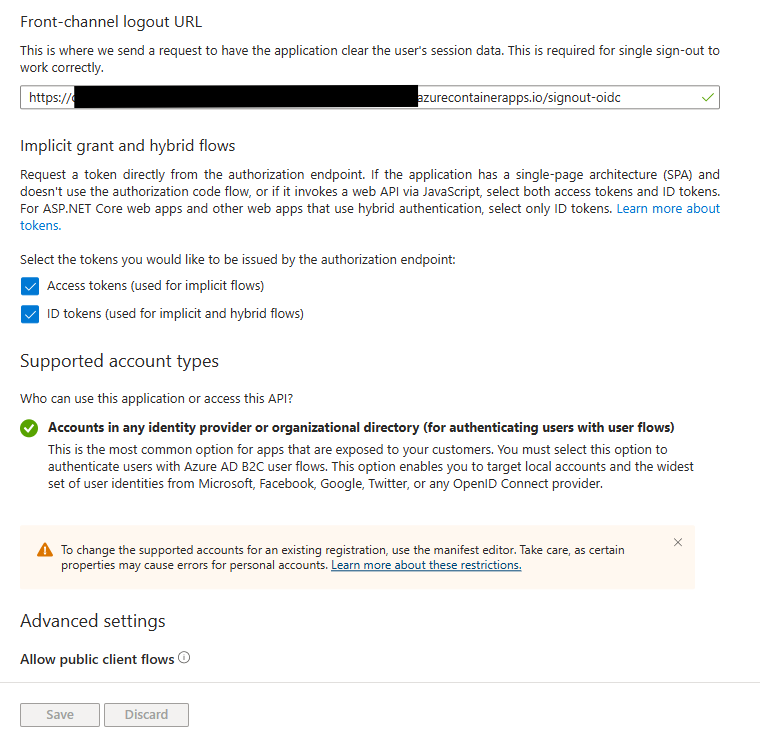
- Bottom of Platform Configuration Window
- For Development, we will need to add 3 Redirect URIs to use:
- Inside the registration, navigate to the authentication sidebar
- We will need an app registration for all 3 environments (Dev, Preprod and Production)
B2C SignUp/SignIn (SUSI) User flow
- Create a sign up, sign in (SUSI) user flow
- Under Properties, this should be configured as follows
Multifactor Authentication: Always On- MFA should always be on and configured for SMS and Calls
Age gating: DisabledPassword Configuration: Strong- Do not configure the usage of CAPTCHA; this has been deprecated in favour of functionality found in Cloudflare’s WAF. All production sign in flows should be configured to go through the Cloudflare WAF
- Configure application claims to contain the following:
- Email Addresses
- Display Name
- User’s Object ID
- For development purposes, we also create a automated SUSI flow that will allow us to skip MFA during authentication. This should only be used in Azure Devops pipelines and for local automated tests; never use this in a deployed environment
- By convention, we can give it the same name as the typical user flow, suffixed with
_automation - Under Properties, this should be configured as follows
Multifactor Authentication: OffAge gating: DisabledPassword Configuration: Strong
- By convention, we can give it the same name as the typical user flow, suffixed with
- Under Properties, this should be configured as follows
Project Setup
Program.cs
- The following packages should be included in the main project:
Microsoft.AspNetCore.Authentication.OpenIdConnectMicrosoft.Identity.Web
- You will also need to bind the Azure B2C configuration and add the Authentication and Microsoft identity web app middleware
builder.Services.AddOptions();
builder.Services.Configure<OpenIdConnectOptions>(builder.Configuration.GetSection("AzureAdB2C"));
builder.Services.AddAuthentication(OpenIdConnectDefaults.AuthenticationScheme)
    .AddMicrosoftIdentityWebApp(options =>
    {
        builder.Configuration.Bind("AzureAdB2C", options);
        if (builder.Configuration.GetValue<bool?>("AzureAdB2C:UseAutomationPolicies") ?? false)
            options.SignUpSignInPolicyId = builder.Configuration
                .GetValue<string>("AzureAdB2C:SignUpSignInPolicyForAutomationId");

        options.Events ??= new OpenIdConnectEvents();
        options.Events.OnRedirectToIdentityProvider += async (context) =>
        {
            var token = context.Properties.Items.FirstOrDefault(x => x.Key == AuthConstants.TokenHintIdentifier).Value;
            if (token != null)
                context.ProtocolMessage.SetParameter(AuthConstants.TokenHintIdentifier, token);

            var redirectUri = builder.Configuration.GetValue<string>("AzureAdB2C:RedirectUri");
            if (!string.IsNullOrEmpty(redirectUri))
                context.ProtocolMessage.RedirectUri = redirectUri + options.CallbackPath.Value;
            await Task.CompletedTask.ConfigureAwait(false);
        };
        options.SaveTokens = true;
    });
- Finally, add the UseCookiePolicy and Authentication Middleware
app.CookiePolicy();
app.UseAuthentication();
Controllers/OfqualAccountController.cs
- Add an authentication controller to the project with a Sign in and Sign out endpoint:
[]
[]
[]
public class OfqualAccountController : Controller
{
private readonly IOptionsMonitor<MicrosoftIdentityOptions> _optionsMonitor;
public OfqualAccountController(IOptionsMonitor<MicrosoftIdentityOptions> optionsMonitor)
{
_optionsMonitor = optionsMonitor;
}
[]
public IActionResult SignIn([FromRoute] string scheme)
{
scheme ??= OpenIdConnectDefaults.AuthenticationScheme;
var redirectUrl = Url.Content("~/");
var properties = new AuthenticationProperties { RedirectUri = redirectUrl };
properties.Items["policy"] = _optionsMonitor.CurrentValue.SignUpSignInPolicyId;
return Challenge(properties, scheme);
}
[]
public async Task<IActionResult> SignOutAsync([FromRoute] string scheme)
{
scheme ??= OpenIdConnectDefaults.AuthenticationScheme;
// obtain the id_token
var idToken = await HttpContext.GetTokenAsync("id_token");
// send the id_token value to the authentication middleware
var redirectUrl = Url.Content("~/");
var properties = new AuthenticationProperties { RedirectUri = redirectUrl };
properties.Items[AuthConstants.TokenHintIdentifier] = idToken;
return SignOut(properties, CookieAuthenticationDefaults.AuthenticationScheme, scheme);
}
}
AzureAdB2C Appsetting/Environment Variables
- Add the following settings
Instance: The URL of the B2C service used to authenticate.ClientId: The Application ID of the service we will be running.Domain: The domain we will be authenticating under.SignUpSignInPolicyId: The policy name for the typical Sign up/Sign in flow.SignUpSignInPolicyForAutomationId: The policy name for the automated Sign up/Sign in flow, this might be required but should not be set in production environments.UseAutomationPolicies: This flag is used in development to determine if the application uses the typical or automated Sign up/Sign in flow. This should only be set to true when using automated testing.CallBackPath: The callback path when signing in to Azure B2C, typically set to /signin-oidcSignedOutCallbackPath: The callback path when signing out of Azure B2c, typically set to /signout-callback-oidcRedirectUri: This is an optional parameter used to override the sign in redirect URI, We should not need to set this in most cases, however, we have had to implement this for development and CI Playwright testing as a workaround.